Live Support 10AM – 6PM EST // FREE U.S. SHIPPING!

Multi Instrument Panel

Multi Instrument Panel

SKU: DP-MP-01
Rated 5.00 out of 5 based on 3 customer ratings
(3 customer reviews)

$499.00

Enhance your flight experience with real-time, high-fidelity instrumentation.

Note: Windows OS only — not compatible with Mac.

- +

-

Payment options:

Take Your Cockpit to the Next Level

The Multi Instrument Panel from Desktop Pilot is the ultimate upgrade for flight sim enthusiasts seeking a realistic, interactive cockpit experience. This high-quality instrument panel brings essential flight data to life with stunning clarity, offering everything you need for a true-to-life virtual flying experience.

Designed for seamless integration with your flight sim software, this panel delivers real-time updates of your critical flight instruments, including the Attitude Indicator, Altimeter, Speed Indicator, and more. Whether you’re a hobbyist or a serious aviator, it’s the perfect addition to your setup.

Custom-Engineered for Realism

Skyhawk-Inspired Instrumentation
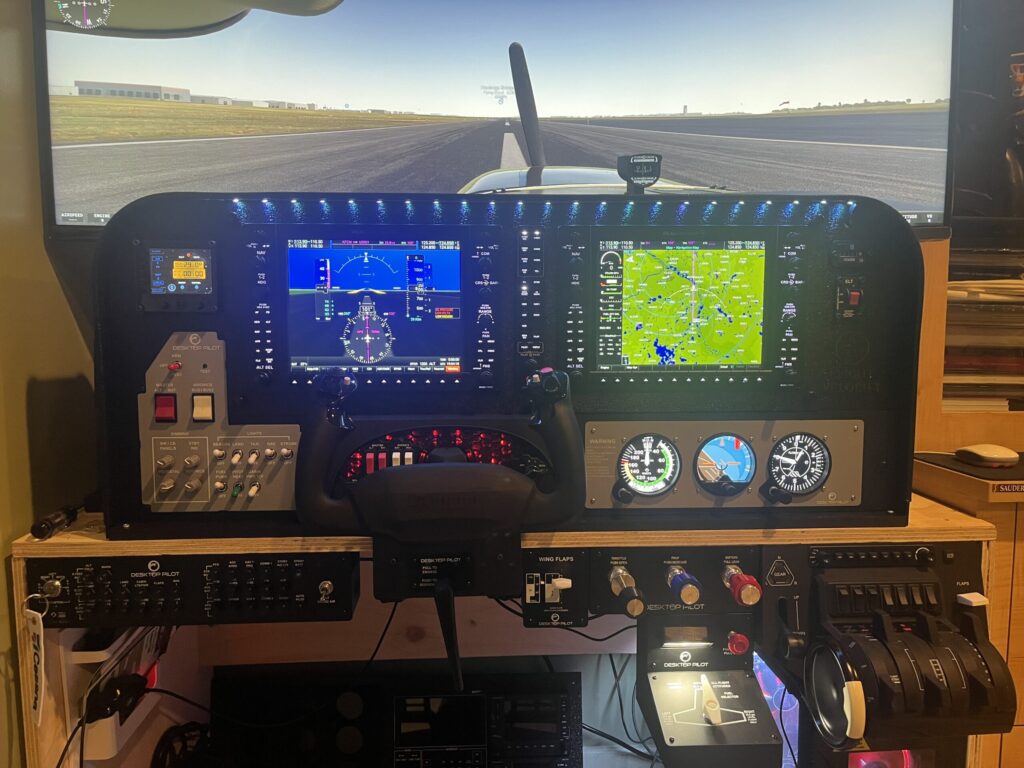
Accurately modeled after the Cessna 172 Skyhawk, the panel recreates its essential gauges and flight data presentation using custom graphics via SkyView software.

Included Analog Instruments

  • Airspeed Indicator – Displays indicated and true airspeed (KTAS) in knots
  • Attitude Indicator – Shows pitch and roll, aiding in aircraft orientation
  • Altimeter – Indicates current altitude with adjustable barometric settings

Rotary Encoders & Interactive Controls

  • KTAS Encoder – Adjusts Knots True Airspeed dynamically based on conditions
  • Flight Director Encoder – Aligns the indicator “hoop” within the Attitude Indicator for precision path tracking
  • Barometric Pressure Encoder – Adjusts the altimeter to current atmospheric pressure

Additional Functionalities:

  • Press Airspeed Encoder → Battery Reset (X-Plane Exclusive)
  • Press Altimeter Encoder → Resets pressure to standard 29.92 inHg
  • Press Attitude Encoder → Toggle between Graphical Mode and Textual Mode

Adjustable Instrument Brightness

Using the STBY IND potentiometer on the optional Desktop Pilot Switch Panel (sold separately), you can easily fine-tune the brightness of analog instruments—ensuring perfect visibility in all lighting conditions.

Two Display Modes

  • Graphical Mode (Default) – Displays traditional analog-style instruments
  • Textual Mode – Shows flight data as digital numerical readouts for increased readability or accessibility

EASY SETUP & INSTALLATION

Setup takes just minutes:

Secure the Multi Instrument Panel to your desktop or seamlessly integrate it into your   cockpit using the included mounting hardware.

Plug the panel directly into a USB port on your Windows-based PC or an external USB hub

Download and install the included SkyView and SkySync software from Desktop Pilot.

Start X-Plane or Microsoft Flight Simulator — the panel automatically syncs and is ready to fly.

PERFECT FOR

  • Flight sim enthusiasts seeking ultra-realism
  • Pilots training on virtual systems
  • Advanced sim setups for serious flight training

COMPATIBILITY

The Multi Instrument Panel is designed for seamless integration with a wide range of popular flight simulation platforms when connected to a Windows-based PC. Supported software includes:

  • X-Plane 11 & 12
  • Microsoft Flight Simulator 2020 & 2024

The panel operates using Desktop Pilot’s SkyView and SkySync software, both of which are included with your purchase.

Ready to Elevate Your Flight Experience?

At $499.99, the Multi Instrument Panel offers unmatched quality and realism at a competitive price. Take your flight sim experience to the next level and feel the thrill of controlling a real-time cockpit, all from the comfort of your home.

Order Yours Now and Take Off!

Add to Cart

For Questions or Support:

Reach out to our knowledgeable team for help with installation, configuration, or flight sim advice at sales@desktoppilot.com or call us at (888) 296-9150.

Join thousands of pilots and flight sim pros taking their training to the next level with Desktop Pilot!

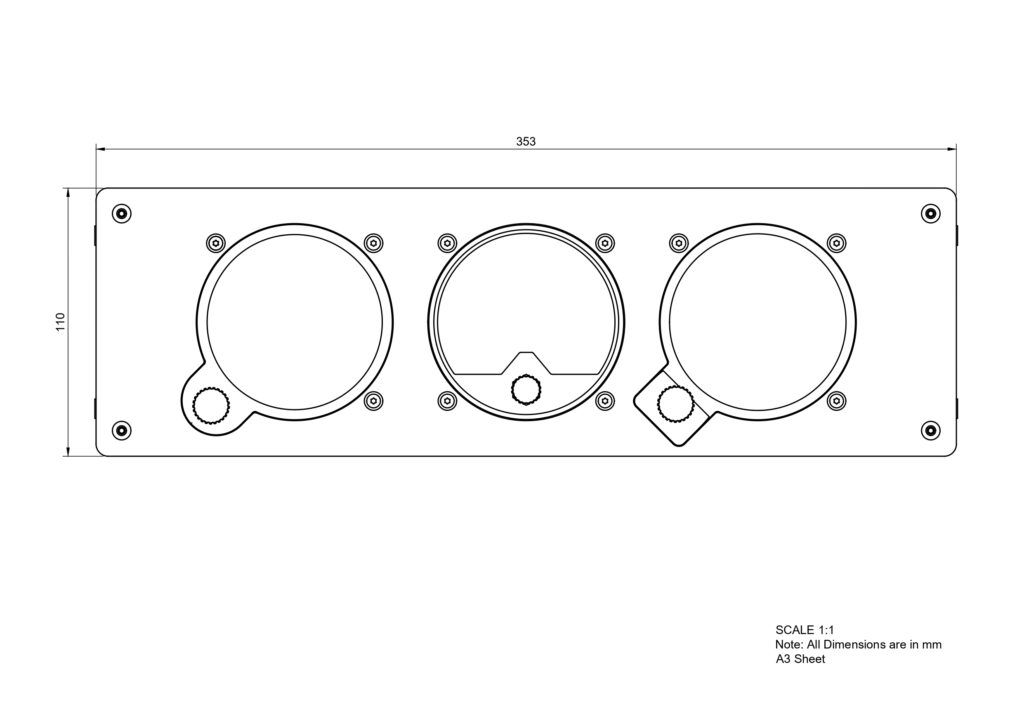
Multi Instrument Panel Dimensions


CUSTOMER REVIEWS

3 reviews for Multi Instrument Panel

5.0
Based on 3 reviews
5 star
100
100%
4 star
0%
3 star
0%
2 star
0%
1 star
0%

Customer Images

Image #1 from Terry Young

Terry Young

Definitely adds a level of realism , enjoyment and functionality to my flight simulator

Image #1 from Terry Young
1-3 of 3 reviews
  1. C

    Well done and great quality! Love the point that this is small and can accomodate my leaner GA setup.

  2. SB

    I would highly recommend this Multi Instrument Panel. As with all Desktop Pilot hardware, it is very well made and very realistic. the MIP add yet another layer of realism to the flight sim world. This product is easy to install and setup however, if there are any hiccups or issues, their tech support is right there to assist. They are very responsive and will work to get you off the ground as quick as possible.

  3. TY

    Definitely adds a level of realism , enjoyment and functionality to my flight simulator

    Image #1 from Terry Young
Add a review
Multi Instrument Panel Multi Instrument Panel
Rating*
0/5
* Rating is required
Your review
* Review is required
Name
* Name is required
Add photos or video to your review
Desktop Pilot

Fully Customizable To Meet Your Needs

Experience the essence of flying from a whole new perspective.
Plug and Fly on Windows
Quality Tested
Compatible with Microsoft Flight Simulator, X-Plane, and More!
Real-Time Support
30-Day Money Back Guarantee
User-Friendly

GET 10% DISCOUNT

Sign up for our monthly newsletter and enjoy 10% off your first purchase. Stay in the know about all things flight sim, get lots of inspiration, and find out about new product offerings.
*Please note: if you create your own bundle, the bundle packs are already discounted by 10% and cannot be combined with any other offers, discounts, promotions, or coupon codes.